diagrams
Common diagram types
Tell your AI which one you want. Here are the ones to start with.
Flowchart
Use it when you need to show a process or branching decisions.

View source
mermaid
flowchart LR
  A[Visitor] --> B{Has account?}
  B -- Yes --> C[Sign in]
  B -- No --> D[Sign up]
  D --> E[Verify email]
  C --> F[Dashboard]
  E --> F
Sequence diagram
Use it when you need to show how parts of a system talk to each other over time.
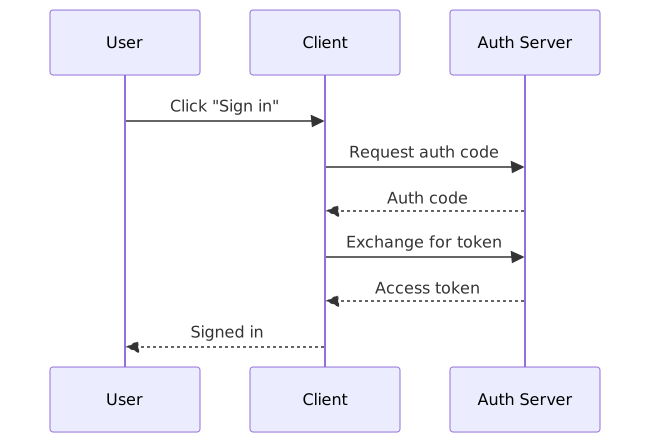
View source
mermaid
sequenceDiagram
  participant U as User
  participant C as Client
  participant A as Auth Server
  U->>C: Click "Sign in"
  C->>A: Request auth code
  A-->>C: Auth code
  C->>A: Exchange for token
  A-->>C: Access token
  C-->>U: Signed in
State diagram
Use it when you need to show how something changes status over time — order lifecycle, subscription stages, deploy pipeline.

View source
mermaid
stateDiagram-v2
  [*] --> Placed
  Placed --> Paid: payment received
  Placed --> Cancelled: cancelled by user
  Paid --> Shipped: order fulfilled
  Paid --> Refunded: refund issued
  Shipped --> Delivered: delivered to customer
  Delivered --> [*]
  Cancelled --> [*]
  Refunded --> [*]
ER diagram
Use it when you need to show a database schema — entities, relationships, and cardinality.

View source
mermaid
erDiagram
  USER ||--o{ ORDER : places
  ORDER ||--|{ ORDER_ITEM : contains
  PRODUCT ||--o{ ORDER_ITEM : "ordered as"
  USER {
    string email
    string name
  }
  ORDER {
    string id
    date created_at
  }
  PRODUCT {
    string sku
    string name
  }
Class diagram
Use it when you need to show OOP structure — classes, inheritance, and what each one is responsible for.

View source
mermaid
classDiagram
  class PaymentProcessor {
    +charge(amount) bool
    +refund(id) bool
  }
  class StripeAdapter {
    +charge(amount) bool
  }
  class PayPalAdapter {
    +charge(amount) bool
  }
  PaymentProcessor <|-- StripeAdapter
  PaymentProcessor <|-- PayPalAdapter
Architecture diagram
Use it when you need to show the system at a CEO or board level — what the product is, who uses it, and which third-party services it depends on.

View source
mermaid
flowchart LR
  subgraph users[Users]
    U[End user]
    A[Admin]
  end
  subgraph product[Our product]
    W[Web app]
    DB[(Database)]
    W --> DB
  end
  subgraph external[Third-party services]
    AUTH[Auth provider]
    PAY[Payment processor]
    EMAIL[Email service]
    AI[AI model API]
  end
  U --> W
  A --> W
  W --> AUTH
  W --> PAY
  W --> EMAIL
  W --> AI